Monday, July 11, 2022

Fixing a third commodore plus/4, or "god damnit adrian stop it"

Here's a fun and easy one to fix.

One commodore plus/4. Here's what it displayed.


Looks like the TED chip is outputting something, but it isn't setup right.

So I pop it open. There's the right clock on pin 1 of the CPU - switching between 1 and 2MHz as it does. Ok, so let's check the ICs.

Hm, there's something wrong with the CPU pins.


And this socket ... is kinda busted looking. One whole side of pins just aren't making contact correctly.


Anyway. I removed the socket, replaced it with a new one and ... well, that was it!


The end!


Monday, May 23, 2022

Getting new simgen backdrops on my amiga 500

This'll be nice and short.

I wanted to add some new backgrounds to simgen, which is a hack on Amiga Workbench 1.3 setups which allows for a 1 or 2 bpp (2 or 4 colour) background image.

Part of it is figuring out how to convert to a suitably formatted IFF (interchange file format) for an Amiga. I didn't want to install photoshop or do photo conversion on the Amiga. Yeah I'm lazy.

So the TL;DR is:

  • https://github.com/Pixinn/rgb2amiga - rgb2amiga converts images to IFF using Imagemagick 6. Yes, make sure you install ImageMagick 6 as the latest version API has changed enough for this to fail compilation.
  • Make sure you resize the original image to a suitable resolution for your desktop - I'm using 640x200, and I'll play with 640x256 later.
  • Make sure you also realise the output screen is 4:3, so crop appropriately.
  • Run the program, and see what happens.
Here's the input and output images:


Yes I know I didn't crop it to the right aspect ratio; I just wanted to see if it worked before I spun cycles on optimising things.


Thursday, May 19, 2022

It took me WAY too long to get this gotek to work...

 The short version - when you buy an actual OG Gotek with the OG Gotek firmware, it doesn't work in any convenient way that is documented on any of the retro computing sites, because you DEFINITELY need to flash it with different firmware.

Ok, so the less short version!

I picked up a busted Amiga 500 for free to help repair an Amstrad CPC464 for someone. It had a busted ROM socket, busted RAM and some other random crap that I needed to fix. Oh and 50 of the keys were not working, and the key membrane was broken!

So everything above is fixed - and I still need to fix the RTC in the A501 memory expansion - but now I need to get it to boot. And I don't have a spare floppy drive for this.

But I did have a Gotek - I bought it for the IBM PC stuff, but I ended up bootstrapping it using USB 3.5 inch floppy drives.

.. and it didn't work. And I didn't understand why.

So, the summary.

I wanted to flash the FlashFloppy Gotek stuff from https://github.com/keirf/flashfloppy/wiki/Firmware-Programming. Easy peasy. Get a UART hooked up and connect to FreeBSD.

Didn't work. Welp.

After reading around I found that someone tried at 9600, because it just wouldn't work faster.

I did that and well now it does. It's quite possible if I added the 10k pull-ups mentioned on the flashfloppy hardware mods section that I'd have more luck.


.. and flashing it from FreeBSD:


Easy.

Ok, next. Hooking it up. Set it to be device 0, remove another config jumper. Easy. Also, apparently the pinout is .. reversed on the amiga 500? In any case, pay super close attention to the orientation of the floppy drive connectors.


Anyway. Now it works. I then followed the installation instructions for a USB stick and whacked Workbench 1.3 images on - and now it boots fine into workbench 1.3. I've ordered a replacement mounting frame for the Gotek board so it can sit in with the case closed - but for now the machine works.

Well, besides the RTC. That's next. Ugh.

Saturday, May 14, 2022

Amiga 1200 - Kickstart 3.1.4 upgrade, but not upgrading to AmigaOS 3.1

 So I splurged a couple bucks on the updated AmigaOS 3.1.4 from Hyperion. It came with both the ROMs and AmigaOS. Now, I have 3.1 installed already, and I wanted to just drop in the ROMs.

It almost worked.

It looks like they moved some libraries from the ROM out to disk/RAM in order to make space.


So I figured they were on one of the installation disks, and....

Easy peasy. I copied icons.library and workbench.library to my system partition and rebooted. All good!


It's really quite slick how Kickstart ROMs are basically a bootloader and then a whole bunch of libraries, some of which form the core OS and some are actually just libraries. I'm sad this concept didn't show up elsewhere.


Monday, February 7, 2022

At least cross compiling for the Amiga 500 is easier than the 16 bit DOS mode PC stuff

I wanted to hack on Amigaterm (https://aminet.net/package/comm/term/amigaterm) a bit, but I found out that someone already had done that (https://aminet.net/package/comm/term/amigaterm_enh). They fixed some bugs and added speeds above 9600 baud - 19200 works fine on the Amiga 500, and 38400 works fine on the Amiga 1200.

But I wanted to add a couple more things - play with what Amiga calls "serial hardware flow control" (which is .. not quite what you expect...) and fix up xmodem receive to allow it to truncate data at a particular file size. Without the truncation option the written file is a multiple of the xmodem block size (128 bytes) which results in binaries you can't actually run.

Anyway.

There's a very nicely put together build framework targeting m68k Amiga at https://github.com/bebbo/amiga-gcc . I haven't built it yet on FreeBSD - just Ubuntu Linux and MacOS/X. Then I wanted to get amigaterm to compile for workbench 1.3 as that's what is on my Amiga 500. It turns out that's quite easy - you just need to use the right command line option (-mcrt=nix13), but you need to be sure that you're not trying to use library versions and functions that are later than what 1.3 supports.

This did trip me up - there's a ChangeFileSize() in later OS versions (4.0 I think?) that isn't in 1.3, but there is SetFileSize() in 1.3 (library version 36). I ended up opting for just not writing out the data instead of writing it out and truncating.

Now that this is working I think I'll go and see if using 128 byte receive data buffers when receiving xmodem packets works better than byte at a time. I need to go and understand how they handled timeouts so I don't end up waiting forever for data to show up. That may end up speeding up receive transfers a little.

What I'd really like to do is bring over or write very small zmodem receive library to really speed things up to make it less painful to transfer the 880 kilobyte disk images (ADF). That'll make bootstrapping things less painful in the future.

Next up is fixobj. The source for that is on the fish-010 disk so I modified it to compile here. It's hard-coded to search the last 128 bytes for the end of an executable binary, which matches the normal 128 byte xmodem block size.

Finally, I've put them both in github here - https://github.com/erikarn/amiga-code .

Saturday, February 5, 2022

Getting stuff onto the Amiga 500, or "holy crap please include bootstrapping serial file transfer utilities in your OS"

Yes, I know I'm ranting about 1980s OSes, but to be quite frank, modern OSes on a variety of hardware still have a similar problem.

Wait, what do I mean you ask? Surely you will always have ethernet/wifi/USB available? I almost started writing a bit on that here given I end up working behind the scenes on modern hardware and a LOT has to be working before you can talk over the network or, heck, even boot your device. But I'll leave that for another day.

This is a similar thing to what I found in a previous blog post about boot-strapping an old PC/AT before I had useful media (read: disks and other working machines.) It's doubly tricky for the Amiga because of it's non-standard floppy disk format that can't be easily read on PCs, let alone written to. You need to have another Amiga, or some modern multi-format disk interface like the Catweasel. I lucked out and at least got working Workbench 1.3 Main and Extra disks with the Amiga 1000 I picked up - but no working Kickstart disk, hence why I'm working with the Amiga 500 right now.

Anyway, the goal of this is to get the following to work:

  • Figure out how to transfer a simple program to get a single binary over in a useful way;
  • Transfer a small enough program over to do xmodem/ymodem/zmodem;
  • Use that to bootstrap the tools to write disk image files to an Amiga 880K disk; and
  • Also write out a working Kickstart 1.3 disk for my Amiga 1000.
This is... surprisingly annoying to do.

Firstly, how to get the initial files over. Workbench didn't come with a file transfer program, even with AmigaDOS. xmodem was around in the late 70s so it could've been used. Oh well. Luckily the Extras disk includes AmigaBASIC which can speak to both the disk and the serial port. And there are guides out there for how to write a simple non-error-checking binary receive program - I used this one.

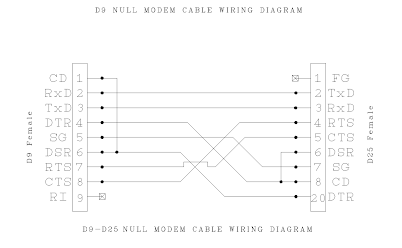
I also needed to make a null modem cable up. Now, the Amiga 500/1000 used some of the RS-232 port pins for things other than ground, so it's best you make one of your own. Here's what I used for my Amiga 500.


The Amiga 1000 uses a reversed serial port, and I will figure out that particular hilarity once I get it booting with Kickstart.

However! Not everything was, err, well documented. I remember Amiga stuff in the 90s, but not THAT well.

First up - the receive.bas program in the above link doesn't at all set the serial parameters. So before you start it you need to run the Serial preferences program and configure it up. It also assumes that you're using 1024 byte buffers, so you need to do the following:
  • Set the speed - I used 9600, it's somewhat reliable here;
  • 8/N/1, which is already setup;
  • Buffer size 1024 bytes, not 512 bytes;
  • Hardware flow control!
Then yes, on the linux side I did the same (stty 9600 -parenb cs8 crtscts -ixon -ixoff raw iutf8 -F /dev/ttyUSB0).

Ok, then running the program. It's best you get the data going into the ram disk, so set your file target as RAM:filename. Easy.

Except the block size thing. Apparently with the way AmigaBasic speaks to the serial driver the transfers have to be in block sized blocks, not just the file size. So you need to pad the file you're sending. The receive.bas program will write out the correct length for you.

I did something like this:

  • dd if=file bs=1024 conv=sync > /dev/ttyUSB0
That padded it correctly and .. well, after a few attempts I can get a ~ 20k binary to transfer OK.

Then comes the fun part, what to transfer. I started by transferring lharc. However, apparently the later versions don't work with Workbench 1.3! I had to use https://aminet.net/package/util/arc/LhA_e138 .

It took a few goes, but yes, I got a working lharc tool on the floppy disk.

Next up is transferring something less terrible to transfer files with. A lot of things are lha'ed, which is why I spent a lot of time trying to get lha to transfer. Next time I won't, I'll unpack them on the linux sending host and send the binaries.

I needed a small transfer program to work on Workbench 1.3. I found https://aminet.net/package/comm/term/amigaterm . It's small, it runs on Workbench 1.3 and it has xmodem support. Nice!

However! It's xmodem support doesn't ask for the receive file size, so it rounds it up to the nearest block size. No! Things like lha then don't seem to work right and binaries certainly don't run.

Ok, so how'd they do it in the 80s/90s? It turns out there's a little utility called "fixobj" which tries to find the actual end of a binary object inside a file and truncates it there. I unpacked https://aminet.net/package/misc/fish/fish-0010 and grabbed the small binary from it. Now I can transfer individual programs, like https://aminet.net/package/disk/misc/adf2disk11, to write out an ADF image to disk.

So, that's transferring right now upstairs via xmodem at 9600. Yeah it'll take a while. Luckily 901120  bytes (the size of an ADF image) is exactly 7040 blocks of 128 bytes each, which is what xmodem is using. Thus I should be OK without having to truncate stuff.

Once that's done I can start transferring things to get the IDE disk add-on I have here booting, and I can setup the rest of this Amiga 500 to do fun things.

What I think would've made this easier?
  • Some tiny xmodem program that can be transferred over serial relatively quickly, and can receive exact file sizes (ie it'll truncate the last block if needs be)
  • A program to actually truncate a file at a given offset so you can use amigaterm as-is to transfer files slowly but reliably, and then just manually truncate it to where it needs to be in order to use it.
  • ... and then some less tiny but working zmodem program that'll work with Workbench 1.3 to get files on and off the thing.
In any case I'm hoping by tonight I'll have this thing writing out ADF disk images OK albeit slowly, and I'll see if I can get zmodem working on something faster like 19200 baud.

Tuesday, February 1, 2022

Hacking up an Amiga 500 for 1MB chip RAM and 512k slow RAM

 In a previous post I dumped a bunch of information I had learnt about what had happened in open source Amiga hackery. I've now gone and committed the initial hacks needed to prove that it works and document how I did it.

My goals here were:

  • Build one of the memory expansion Gary adapters that are out there - I chose the PeteAU design that I've checked in here;
  • Figure out how to modify a rev6 amiga 500 board so I can put 1MB of chip RAM in the provided sockets there (with the schematic available here);
  • Make it so a normal A501 512K RAM + RTC add-on can be plugged in to provide the 512k of slow RAM.
First up, it worked. Here's how dirty it is.


The overview is pretty conceptually easy.

  • The PeteAU Gary adapter (and I'm sure others!) use the RAS1 line into Agnus and its A19/A23 address line to map RAM into Agnus' other 512k addressable RAM space. The RAM expansions are thus muxed on breaking out CASL and CASU lines whilst enabling RAS1.
  • The little break out PCB there is the 74HCT139 dual 2-to-4 demux to decode the two address line bits from the Gary adapter + CASL/CASU lines from Agnus into four CASL/CASU lines.
  • The "first" bank from the PeteAU Gary adapter is mapped in as the second half of the 512k chip RAM - and as seen in the picture above, those bent legs are CASL/CASU lines.
  • The two tracks that run from U35 out to the trapdoor expansion connector are the CASL/CASU lines to said trapdoor expansion connector. I've cut those and wired them into the second CASL/CASU pair from the 74HCT139 demux.
  • No modifications are done on the A501 expansion board.
I've basically just migrated the 74CHT139 from the PeteAU Gary+RAM expansion adapter board back onto the Amiga 500 rev6 PCB.

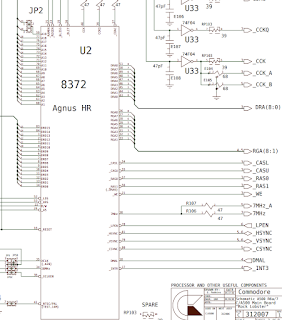
Here's the relevant bits from the rev6 schematic:


The second bank of 512k chip RAM is U20,U21,U22,U23. It uses RAS1 and the same CASL/CASU that the first bank of 512k chip RAM and the expansion connector.

On the rev6 PCB the CASL/CASU tracks route from U35 to both the RAM and the expansion connector. Cutting the tracks going to the expansion connector is fine; they run there and stop.

Now, finding useful documentation for what to do.

First up, figuring out how to configure the Amiga 500 rev6 PCB.

  • J2 (the Agnus A19/A23) jumper was cut so it could be wired into the Gary adapter.
  • J7 (the EXP signal from the expansion connector to Gary to say the expansion RAM is there) is left alone, so the A501 can assert it if it's there.
I have found a better summary of what to put in the Gary adapter, so here it is.


And then how I configured my Gary adapter board:


  • JP1 and JP2 set to 2-3 - ie 1M chip
  • JP3 set to 1-2 - ie 1.5M slow (decoding all of the space, even if I'm not really decoding stuff from the 74HCT139 to more slow RAM)
  • JP4 set to 1-2 (ie, "more slow", so the Gary adapter is properly doing its thing)
And finally, how it looks when it's all done:


(Yes, I was playing with the default colours in the second one, I always disliked the orange.)

If I wanted more RAM then I could easily just piggy back more 41256's on top of the ones I've added and break out the CASL/CASU lines some more, but ... (a) I don't want to, and (b) in that case I'd really just go and build a full 1.5MB slow RAM expansion and undo what I did on the PCB here.